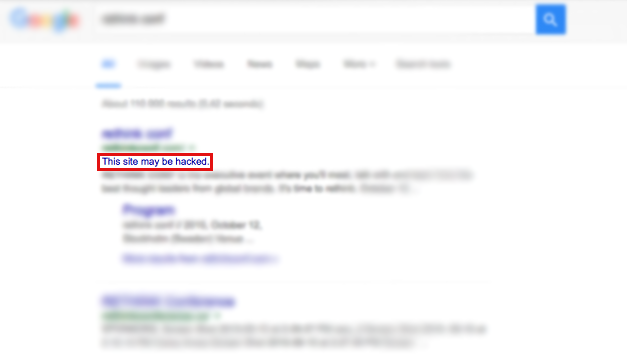
You might have noticed that Google occasionally flags some websites with a “This site may be hacked”-flag or a “This site may harm your computer”-flag. This is bad for your business because it could scare away potential customers, as Google’s recommendation is to avoid visiting flagged sites.
This guide explains what the flag means and how you can remove it.
What it means
If a website is flagged, it has served either malware or spam advertisements recently. We can assume that is not your intention, and therefore the only logical assumption is that someone has hacked you.
It is also possible that you have not been hacked, but instead an advertisement company having serving advertisements on your website.
For those who prefer to watch and listen, here is a Youtube video from Google explaining their flagging system:
What to do after being hacked
So, you have identified you have been hacked. What now?
Sign up for Google’s search console. You will be able to find more details on why you got the flag and other information regarding this.
Realize it most likely is not personal. Hackers want to hack as many as possible, not you specifically. There is no reason to panic, people have survived getting hacked before.
Contact your hosting company. They may be able to help you out, and they should also be interested in the attack against you as that could affect their other customers.
If possible, take your website offline. This ensures that the hacker cannot do anything more, and allows you to continue with the following steps without the hacker interfering.
Scan your own machine for malware with an antivirus program. It is possible that someone has infected your computer and got access to your site that way.
Assume everything is leaked. Every password needs to be changed. This includes admin accounts, FTP-accounts, internal databases etc. If you have user accounts registered at the site, reach out to them and explain what has happened. It may not be fun to give them bad news, but they will be even angrier if they find their credentials leaked online without you informing them about it.
Clean up after the attackers. This can be very hard to do yourself if you are not technically minded, and we would recommend you to hire someone for the task. If possible, do a clean install of the system to ensure hackers have not planted any backdoor.
If possible, identify how the hacker was able to get in and fix that security hole.
After cleaning up the system you want to make sure it never happens again. This is where services as Detectify come in, scan your site using our system to identify and fix vulnerabilities so hackers cannot use them against you!
Bring your site online again.
See this is a lesson to start doing back-ups if you are not already doing so you do not risk losing information just because you got hacked.
Make sure your site is not on any blacklist of hacked websites that you would like to be removed from.
Login to the search console again and request a review of your site so Google will remove the flag.
If anything is unclear, do not hesitate to contact us at support@detectify.com and we will help you as best we can.
If your application security program only tracks known Common Vulnerabilities and Exposures (CVEs), you’re probably missing a large share of your real risk. Across the …
We’ve been listening to dozens of CISOs. In roundtables, peer forums, customer and prospect calls, on the record, off the record, at event floors and …
For years, development and security practitioners have treated dynamic application security testing as a critical final safety check before code goes live. However, the external …
Scaling application security and attack surface monitoring inside a single enterprise is a massive headache. In June 2026, the Department for Science, Innovation and Technology …